Get @replies From Twitter SMSed (India)
UPDATE #2: Twitter & AirTel have (re)started their service by which you can subscribe to a user and get your DMs SMSed to you. Incase you want your @Mentions SMSed, I’d suggest you create a new user, feed this account your @Mentions via RSS and enable updates to be sent to the phone for this user. On the user’s profile page, click on the icon next to “Following”
UPDATE: I used this method for a couple of days and unfortunately found that it isn’t very efficient because Google does not SMS you every time you get a reply. Being free, you cans till try it, but don’t rely on it. You will get the SMS when least expected and not get it when most wanted. Sorry.
Twitter is an amazing service. The more time I spend on it, the more I get addicted to it. It started off from being this micro-blogging site where you would share your status with the people who follow. It allow you to interact with quite a few interesting people, eg: me. Follow me on Twitter. Twitter allows you to stay in touch and get breaking news at the same time. As of now, Twitter allows you to get your Direct Messages pushed as SMS to your phones and even lets updates from people you choose to be sent to your phone. But, it doesn’t give you your replies as SMS, yeah pisses me too. Here is a neat setup in order to get your Twitter replies sent to you as SMS:
Objective: Get Twitter replies sent to our phone.
Apparatus:
-
Google SMS Channel
-
FreemyFeeds
So let’s get started:
Head over to Google Labs (India) SMS Channel Page.
Set up your account and from the right side click on Try now >>
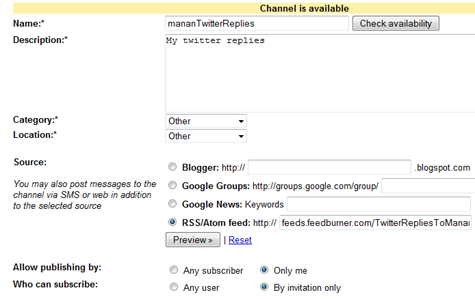
On the next page, you will see a form like this: (Screen shot)
Leave this tab open and go to FreeMyFeed.com and you will see a page like this:

Enter the feed url same as I have in the screen shot, which is http://twitter.com/statuses/replies.rss and also enter your Twitter username and password. you should then see a page that will have a very ugly looking URL, something like this:

Now paste this URL as the source for your Google Channel update and create the channel. Done.
~Enjoy
PS: It will took some time for the SMS to arrive, but it DID come.

I use a method similar to this- I have the Google SMS channel and all, but for the feed, instead of using the official RSS replies feed (http://twitter.com/statuses/replies.rss) I use a Twitter search feed. Go to http://search.twitter.com/ and put in ‘@username’- In my case, ‘@sengupta’.
As far as the merits and demerits are concerned-
With this method, you get all tweets where you’re mentioned, that is, you get tweets even if the ‘@username’ bit is not the first word in the tweet.
With the RSS replies feed method, I believe you only get tweets where the ‘@username’ bit is the first word in the tweet, ie. whatever is in your Twitter replies page. Correct me if I’m wrong.
I’ve been using this method for a while. Like you mentioned, there is a perceptible time delay till the replied are received on the phone. But then again, you only get what you pay for;-)
Yes, it will only send you the ones that begin with @username. The twitter search thing can also be used. But, the time delay is quite too much.
Wow, that’s really useful. Thanks, man.
Bcoz of the new OAuth Manager, we are not able to create the freemyfeed :( ne other work arounds ?