Windows Live Wave 4: Windows Live Mail Changes And New Features
 Windows Live Essentials Wave 4 leaked, yesterday I blogged about the new features and changes in Windows Live Writer Wave 4, here is a quick post on my first-favorite application in the Live Essentials suite (Live Writer being the second, yes) – Windows Live mail. Wakoopa says I’ve used it for 3529 hours, 23 minutes and 23 seconds in the background. It’s my email client and my RSS reader. I like the fact that Windows Live Mail is NOT Outlook. It’s simple and easy to use client. I liked it in Wave 3 but my first reaction to it in Wave 4 wasn’t exactly that of love. I hate the Ribbon interface in it. Takes too much unnecessary place and offers no major functionality improvements. Thanks to twitter friend @Christo27 he tipped me with a way to hide it and now I love Windows Live Mail Wave 4 :D
With Wave 4 Live Mail has brought in quite a few changes and that can be attributed to the Ribbon UI which allows developers to present features in a streamlined way. Some noticeable feature changes in Windows Live Mail Wave 4 are:
Ribbon UI:

*to hide the Ribbon click on the arrow pointing down (next to re-do) and select Minimize Ribbon.
The Ribbon UI has 4 main tabs:
-
Home
-
Folders
-
View
-
Accounts
The Home tab is the one that changes its option depending on whether you’re in the Mail window, RSS Reader window or in the Newsgroups window. The options in the other three remain pretty much the same, except for an option or two added or removed.
When you start going through the regular options you’ll find a few neat touches added. The Newsgroups Ribbon shows a new icon for ‘New Messages’. Talking about icons I like the one for ‘Watch’ and ‘Flag’. The Ribbon UI has brought all the options that were placed under the ‘alt’ menu out into the opening. But I’m still not sold on the big icons.
Compose Mail Window:
The Ribbon in the Compose Mail window makes so much sense. The Compose window now has a proper RTE and image editing options like that in Windows Live Writer. Screen shots:

The picture editing options Ribbon screen shot:

The other two Ribbon tabs included in Live Mail Wave 4 are –
Insert:

Options:

Contacts:
The Contacts window that used to open in a separate window in Wave 3 now opens with Live Mail. The Ribbon here has options to send an email or start an IM conversation given that the contact’s email id is filled in. Ribbon screen shot:

Calendar:
I love the new quick-view of calendar placement on the right of the main screen, reduces my extra click to navigate into the Calendar view. This is only available in the email window and not under RSS, Contacts or Newsgroups. Screen shot:

There are no major changes in the main Calendar window except the Ribbon. Screen shot:

Reading RSS:
Windows Live Mail is one of the best free RSS reader for Windows. In Wave 4, like the Calendar window, the RSS window doesn’t have any changes except the Ribbon. Screen shot:

Newsgroups:
The Newsgroups Ribbon now has a new icon for new message and an option to get ‘Next 300 headers’ in one click. Screen shot:

Configuring Live Mail options:
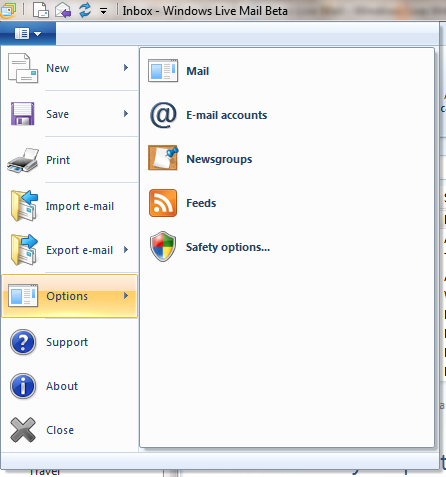
The options for changing the various Live Mail options are now moved under the ‘start’ button on top. Screen shot:

When is it coming out, any ideas?
Thank you for these screen shots Manan. I wouldn’t have guessed that you didn’t like the ribbon after reading this! I love it all, and like you,I also prefer the simplicity of Windows Live Mail. I’ve been using it since it was first introduced as Windows Live Mail Desktop and it beats any other mail program into fits in my opinion.
However, Manan, you should have erased your email account first from those screen grabs in my opinion.
TG
Thanks Manan, I can’t wait to try this out when it becomes available. Looks like a major upgrade. Any Jump List features added to the Mail icon on the Windows 7 Taskbar?
unfortunately, nothing in this build.
Btw Wave 4 drops Windows XP support.
Yea, read that on Neowin, checked it on XP Mode didn’t work. Will post that and some other smaller stuff in another post. Thanks for pointing it out :)
thx .. good info
Will it have support for to-dos tho
it really pisses me off that mail does not have this when hotmail online has it >:(
http://www.yeahreader.com – is also good rss feeds reader