Transitioning to Unifi for WiFi: The Expensive Lessons Learned
Middle of this year, amongst all the chaos in my life, my Amplifi Alien setup decided to die on me, leaving the household without Internet and an annoyed pregnant wife. This was my perfect opportunity to switch to the Unifi stack! I had a defined set of constraints and requirements:
- I wanted to simply replace my Alien’s mesh with a Unifi mesh; this created several constraints:
- Keep my Firewalla firewall in place as the entry to my network
- Use the Unifi Controller installed on my TrueNAS Scale
- I needed a cloud gateway that had WiFi (rackmount gateways were all out as options)
- I didn’t want to spend a lot
- Needed quick delivery
- Future-ready setup
After some quick searching, I ended up ordering:
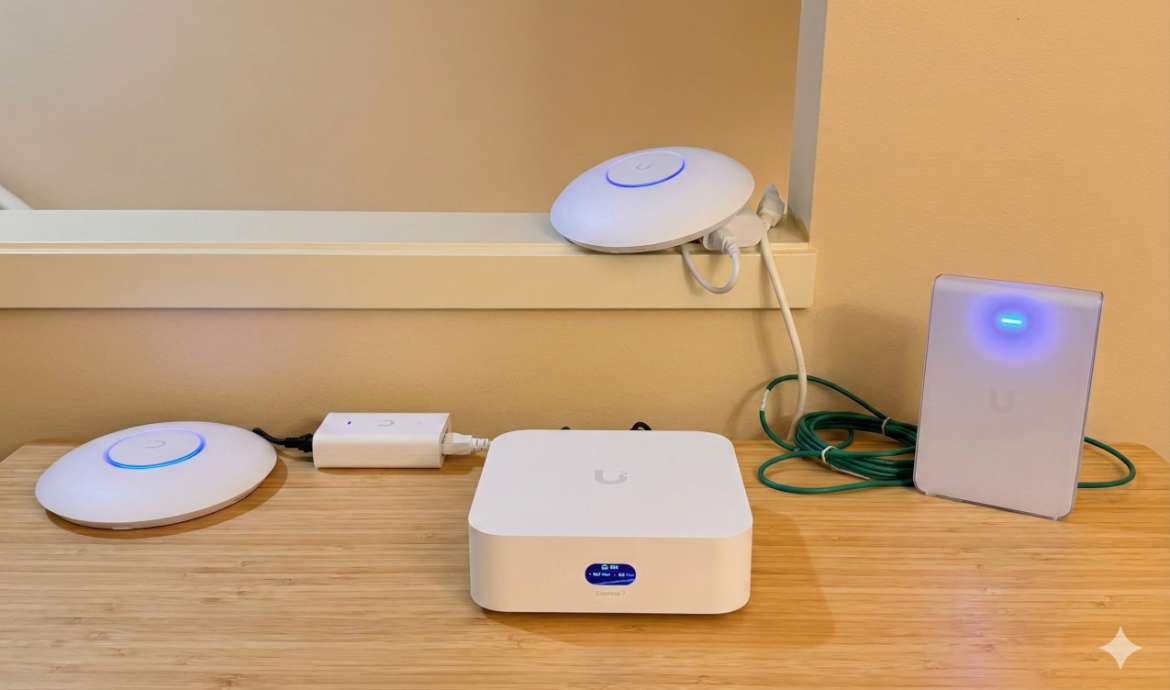
- Unifi Express 7
- 2x U7 Lite APs
The overall transition from Amplifi Alien to the Unifi WiFi stack was supposed to be setup new devices -> awesome WiFi everywhere. Unfortunately, the experience wasn’t such. I learned a lot of expensive lessons along the way, the biggest on being:
Unifi is not a mesh network; it can be setup as one, it is not recommended to be.
The First Lesson: PoE
To set it up as a mesh, I needed a way to power the APs without Ethernet. The solution — I had to order 2x Unifi PoE adapters for each AP. Once connected, I thought this would let me start a future-ready WiFi 7 journey.
The Second Lesson: What are spatial antennas
Unfortunately, the performance was pretty bad, laptops and iPhones were hanging onto a weaker AP. Moving from one floor to another, the laptops would not roam to the closer AP. It turns out, I was about learn my second lesson, U7 Lites have 4 spatial streams — this was terrible for my mesh setup since the data spatial streams were being split with the needs of creating a mesh and the data itself. My solution:
- Buy the U7 Pro Max since it supports 8 spatial streams
I added it to my controller; I even wired it and was very proud of myself that I solved a problem by throwing more money at it.
The Third Lesson: The 6Ghz band chaos
Unfortunately, the problem of Instagram Reels “loading” on the iPhones was not solved (by the way, that’s a great test for real-world WiFi strength and network connectivity alerts). And here I learned my third lesson, U7 Lites don’t support the 6Ghz band. To make this future-proof network setup actually support the devices of the present, I did what any rational human being would do — add more expensive APs. During Unifi’s Christmas sale, I ordered:
- U7 Pro Wall
- U7 Pro
The 6Ghz band is supposed to be the awesome powerful game-changing future of wireless to make home WiFi super powerful — all horseshit by the way.
The Fourth Lesson: The WiFi numbering mess
WiFi 6, WiFi 7, WiFi 6E — they all seem the same but are not the same.
- WiFi 6: Uses 5Ghz and 2.4Ghz
- WiFi 7: Makes better use of 5Ghz and 2.4Ghz, optionally uses 6Ghz for superfast awesome Internet
- WiFi 6E: Uses 6Ghz to make WiFi better but isn’t WiFi 7
The iPhones support both WiFi 7 and WiFi 6E (and there’s an SSID-specific toggle to turn WiFi 6E off). This matters because while iPhones supports WiFi 7 and the Unifi U7 series supports WiFi 7, that does not mean the 6Ghz channel will work like magic.
I turned off WiFi 6E on my and my wife’s iPhones, and that was the first breakthrough — the Instagram Reels test passed. Our Internet was smooth, Unifi console showed the beautiful WiFi 7 icon for the iPhones, I was in the future.
Now, while this solved it for our respective iPhones, I can’t tell every guest at my house to disable WiFi 6E or go around finding how to disable this in laptops and iPads. That’s just being a bad host and a terrible stain on my reputation as a tech-enthusiast. But I landed on some Root Cause — something to do with WiFi 6E.
Fifth Lesson: 6Ghz and walls
To further probe the issue, I kept tracking the iPhone signal strengths in the Unifi Console. I continued to see the iPhones still hanging on to the weaker AP despite me tweaking the radio transmitter power. And this is where I learned my fifth lesson:
- The 6Ghz band very weak, it does not penetrate through walls and relies of line-of-sight
At this point, I realized that no matter how many APs I get with 6 or 8 spatial streams, the 6Ghz issue with walls and Line of Sight limitations aren’t worth my money. I might as well turn off the 6Ghz band in Unifi.
The Sixth Lesson: Apple’s 6E implementation
Not satisfied, I wanted to explore what the Internet thought about iPhones WiFi 6E and the 6Ghz band. While this is all anecdotal and could be some confirmation bias on my part, the iOS WiFi 6E implementation is terrible.
iOS has a “sticky client” problem; it prioritizes 6Ghz over 5Ghz, even if 6Ghz is weaker.
In my case, even defining roaming thresholds in Unifi console for APs does not fix this in a way that iPhones seamlessly switch to a stronger AP. Maybe I could try tweaking it more, not worth it as of now.
Conclusion:
The problem isn’t the Unifi stack, it is the 6Ghz band and iPhones. Given all these lessons, I have for now disabled the 6Ghz band on my main SSID, and there are no interruptions. We now have smooth Instagram Reels scrolling and consumption.
My final Unifi WiFi stack is:
- Express 7 (wired)
- U7 Pro Wall (wired)
- U7 Pro Max (wireless meshed to U7 Pro Wall)
- U7 Lite (wireless meshed to U7 Pro Max)
- U7 Lite (wired)
- U7 Pro — not setup yet
This is in addition to the rest of the Unifi stack in my homelab:
- Switch Pro Max 24 PoE
- Power Distribution Pro
- Toolless Mini Rack (with the Ikea cutting board top)
- Accessories: Keystone panel, Etherlighting patch cable, keystone inserts, dust covers
Good:
- Reliable (and scalable) 5Ghz and 2.4Ghz wireless network
- Looks beautiful
- Great network insights and granular network control
- Future-ready for when I have my own place
Bad:
- Everything is expensive
- Unreliable mesh architecture
- Each AP should have its own coverage visualization without needing WiFiMan on an Android
tl;dr (Generated by Gemini based on analyzing the post):
-
Unifi isn’t “Plug-and-Play” Mesh: Unlike Amplifi or Eero, Unifi is designed for wired backhaul. Using it as a wireless mesh requires a massive “overhead” in spatial streams that the entry-level gear (Lites) can’t handle.
-
The 6GHz Tax: You can buy the most expensive WiFi 7 gear on the market, but it cannot beat physics. 6GHz is fast but fragile; if you don’t have a clear line of sight, it’s often worse than 5GHz.
-
The “Sticky Client” Problem: Even with expensive APs, the end-user device (the iPhone) often makes the “dumb” decision to stay connected to a weak, high-speed band rather than a strong, lower-speed band.
-
The Hidden Costs of Unifi: What started as a “budget” replacement for an Alien router turned into a full-blown setup with multiple $200+ APs.
