IE 9 To Enhance Tab Browsing – Quick Tabs To Be Improved
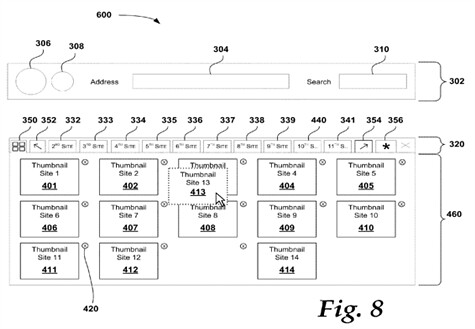
Looks like I’m spending quite a lot of time on the US Patent & Trademark Office website, but it’s totally fun (of course minus the really un-intuitive website design). According to a patent filed by Microsoft on the 22nd of September last year, the little known Quick Tabs feature in Internet Explorer is expected to get more functionality and better tab management options. Quick Tab as of now displays thumbnails of all tabs open and a close button for each tab. The patent images reveal that significant improvements will be made to the Quick Tabs interface. Some of the expected enhancements are:
-
Drag and move the tabs within the Quick Tabs interface.
-
Tab thumbnails would enlarge on mouse-hover.
-
In case your tab row was over flowing with tabs and in Quick Tabs you were to hover the mouse on a tab not currently visible on the tab bar, the overflow icons would change appearance.
Patent images illustrating the above concepts:
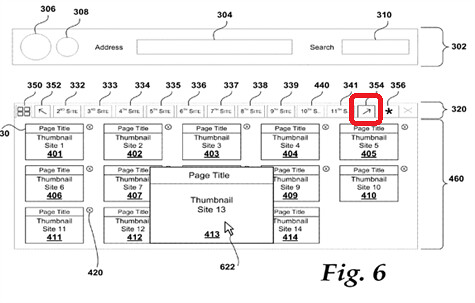
The red highlight shows a darker border to the right overflow icon compared to the one for left, indicating that the web page for Thumbnail Site 13 is on the right.
Internet Explorer 9 was talked about at PDC09 and is expected to be announced at MIX10. This might be one of the many improvements Microsoft is working on for the next release. The Quick Tabs feature isn’t talked about a lot but is very useful while browsing multiple tabs.


wow! This is Great to Hear! IE9 gonna compete big time!
Reading patent documents is fun? Only in your world, only in your world.
Lawer folks have a talent of making even simple things appear agonisingly confusing. It took me two whole minutes to grasp what Microsoft is trying to demonstrate and even after that I am not entirely certain.
lol simply put, they’re improving the Quick Tabs interface that is there in IE. It used to be static and the similar screen is static in all other browsers as well. So these guys are making it a bit more interactive, by adding enlarge on hover & drag-drop addition. :)
Now, with this patent you must not use Firefox with tab add ons :D
Chrome has Drag&Drop already
but that is not for the currently open tabs.